
Road Rash is one of those old-school games that still feels fun today because it mixes speed, traffic dodging, and rough combat on two wheels. The browser version keeps that spirit alive by loading the game directly in a modern tab, so you can jump in without hunting for emulators or setting up a local install. I used to play this game when I was a kid. It brings back a lot of old memories and nostalgia. Seeing it again reminds me of my childhood. It was one of my favorite games back then.
Also Read: Play GTA Vice City in Browser – No Download, Free & Working!
How Road Rash Runs in a browser
DOS.Zone is built around browser-based emulation for legacy DOS and Windows 95-era games, which is why it can launch Road Rash without requiring any downloads. A review of the platform notes that it uses JavaScript-based DOS emulation and can also support Windows 95 titles, which makes it more flexible than a simple ROM-hosting page.
For Road Rash specifically, the site presents the game as a browser-playable title and advertises it as free and ad-free. That makes it a convenient option if you just want to open a link and start racing.
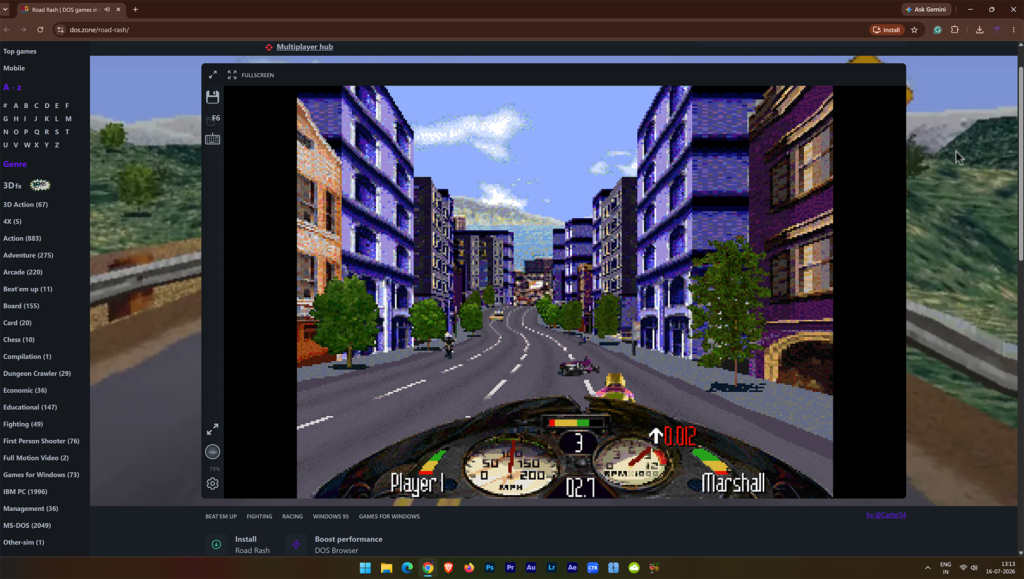
How to play Road Rash in a browser
- Open the game page on
- DOS.Zone Road Rash.
- Wait for the browser emulator to load the game environment.
- Click the game window if input does not register immediately.
- Use the keyboard controls shown by the emulator or site interface.
If the page feels slow at first, give it a few seconds to finish loading the emulated environment before pressing keys too quickly. Browser emulation can briefly stutter during startup, especially on weaker devices or when many tabs are open.
Best setup for smooth play
Use a Chromium-based browser such as Chrome or Edge, since browser emulators tend to work best in modern desktop browsers with good JavaScript performance. A review of DOS.Zone specifically mentions testing in Brave, which is also Chromium-based, and reporting smooth performance in-browser.
For controls, keyboard is the safest default. If the game offers remapping, use arrows for movement and the main action keys for accelerate, brake, and attack, then adjust from there to match what feels natural. Browser retro tools commonly support keyboard input well, and DOS.Zone tutorials also show that the site can be played directly from standard desktop input.
A gamepad is worth trying if the site recognizes it, because continuous steering and combat often feel more comfortable on a controller than on a keyboard. That said, if your controller is not detected cleanly, keyboard will still be the most reliable option.
Quick checklist to Play Road Rash in Browser
- Use a desktop or laptop, not a low-power phone, for the smoothest result.
- Keep only one or two tabs open while playing.
- Start with keyboard controls first, then try a gamepad if the site accepts it.
- Let the emulator fully load before pressing buttons rapidly.
- If performance drops, refresh the page and retry in a Chromium browser.
What to expect from the Browser Version
This version is about convenience and nostalgia, not perfect preservation. Browser emulation can differ from the original hardware experience, but DOS.Zone is a practical way to play Road Rash instantly without setup.
For a lot of players, that is the main win: no downloads, no emulator config, and no waiting. Just open the page and ride.
Also Read: This Tiny BIOS Setting Can Boost Performance
FAQ:
Q1. Can I play Road Rash in a browser?
Yes, there are online platforms that allow you to play it without installation.
Q2. Is it free to play?
Some versions are free, but legality depends on the platform.
Q3. Does it work on mobile?
Yes, it can work on mobile browsers with proper support.
Q4. Do I need high internet speed?
A stable internet connection is required for smooth gameplay.