
If you’ve ever tried to buy a new processor, you’ve probably stared at names like “Intel Core i5‑12400F” or “AMD Ryzen 5 5600X” and thought, “What is all this?” Let me break it down the way I’d explain it to a friend who is building a PC for the first time.
First, what is a CPU?
The CPU (Central Processing Unit) is often called the brain of your computer because it’s the part that actually “thinks” and executes instructions from your software and games. It performs calculations, makes logical decisions, and coordinates how data moves between memory, storage, and other components so that everything runs smoothly. Without a CPU, your PC is just a box full of parts that can’t do anything useful. Now, let’s move to the confusing part: the naming.

Big Picture: Brand, Family, Generation, Model
When you look at a CPU name, imagine it as a sentence with four main parts:
- Brand (Intel / AMD)
- Family (Core i3/i5/i7/i9, or Ryzen 3/5/7/9, etc.)
- Generation (like 5600 vs 7600, or 12400 vs 14400)
- Extra letters at the end (like X, F, G, U, H, etc.)
Once you understand these four, most CPU names start making sense.
Intel CPU Names Explained
Let’s take a classic example: Intel Core i5‑12400F
I’ll break this like I’m literally pointing at the name on a product page for you.
- Intel
This is the brand. Intel and AMD are the two big desktop CPU manufacturers. You already know this from PC parts research, but it’s the first thing to check. - Core
“Core” is Intel’s main consumer CPU line for desktops and laptops. Think of it as their standard series for normal users, gamers, and content creators. There are other lines like Pentium, Celeron, and Xeon, but for gaming and everyday use, you mostly see Intel Core. - i5
This part tells you the “tier” or performance level:
- i3 = entry level, basic tasks, light use
- i5 = mid‑range, great for budget gaming and daily work
- i7 = high‑end for heavy multitasking and productivity
- i9 = enthusiast level, for serious creators and high‑FPS gaming with powerful GPUs So, “i5” means this is a mid‑range CPU. Not weak, not top‑of‑the‑line, but a solid balance.
- 12400
This block is very important. It has two ideas hidden in it:
- The first two digits (12) usually represent the generation.
“12th Gen” Intel means it’s from the Alder Lake generation (in the recent lineup), which brought big architectural changes like performance and efficiency cores. - The last three digits (400) give an idea of the position inside that generation.
Within 12th Gen i5, a 12400 will be lower than a 12600K in performance but higher than something like a 12100. The higher this three‑digit number is (within the same i3/i5/i7 family and generation), the more features or performance you generally get.
- F (the letter at the end)
Intel loves adding letters to tell you extra features or limitations. Here are the most common ones you’ll see and how I’d explain them to you:
- F – No integrated graphics.
This means the CPU itself can’t output display; you must use a dedicated GPU. For gamers who will use a graphics card anyway, an “F” model can be cheaper. - K – Unlocked for overclocking.
If you pair it with a capable motherboard and cooler, you can manually push this CPU beyond its stock speeds. - KF – Both unlocked and no integrated graphics.
- T – Low‑power variant, often used in pre‑built systems where saving power and heat matters.
- H, HX, U, P, etc. – These are mainly for laptop CPUs.
For example, “U” often means ultra‑low power, good for thin notebooks; “H” or “HX” generally means high performance for gaming or content creation laptops.
So just by reading “Intel Core i5‑12400F”, you can tell:
- It’s Intel
- It’s a mid‑range Core i5
- 12th generation
- 400‑series model (mid in the lineup)
- No integrated graphics, so needs a GPU
AMD Ryzen CPU Names Explained
Now let’s take a common AMD example: AMD Ryzen 5 5600X
Again, we’ll decode it piece by piece.
- AMD
This is the brand. Competes directly with Intel and is extremely popular for gaming PCs, especially in budget and mid‑range builds. - Ryzen
“Ryzen” is AMD’s main consumer CPU series, similar to Intel Core. This is what you’ll use for gaming, content creation, and everyday work on desktop and laptop. - 5
Just like Intel, AMD also uses numbers to show tiers:
- Ryzen 3 = entry level
- Ryzen 5 = mid‑range
- Ryzen 7 = high‑end
- Ryzen 9 = enthusiast level So a Ryzen 5 is roughly comparable in “class” to an Intel i5. Good for gaming, streaming, and general work.
- 5600
- The first digit (5) represents the generation.
Ryzen 5000 series is based on the Zen 3 architecture. Ryzen 7000 series is Zen 4, and so on. - The last three digits (600) show where it sits in that generation.
5600 is lower than 5800 but higher than 5300, for example. Within the same generation, a higher last three‑digit number usually means more performance or more features (like more cores or higher clocks).
- X
AMD also uses suffix letters:
- X – Performance‑oriented variant, usually higher clocks and better boosting, aimed toward gamers and enthusiasts.
- G – Includes integrated graphics (APU). Good if you don’t have a dedicated GPU yet or you’re building a very budget system.
- Non‑X – Slightly lower clocks, often better efficiency and sometimes cheaper, but still strong performers.
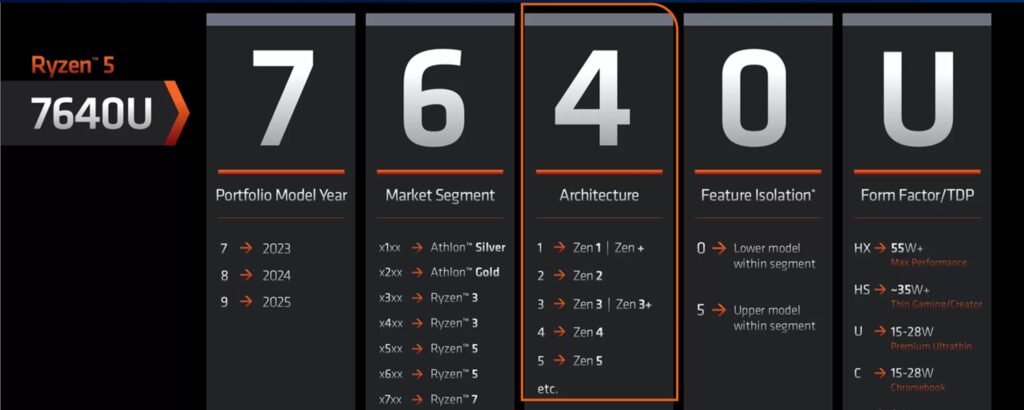
So from “AMD Ryzen 5 5600X”, you can quickly understand:
- It’s AMD
- Ryzen series CPU
- Mid‑range (5)
- 5000‑generation (Zen 3)
- 600 model in that generation
- “X” variant means tuned for performance
Why Generations Matter More Than You Think
One thing I always tell people: don’t just look at “i5” vs “Ryzen 5” and assume they’re equal. Look at the generation
A new generation usually means:
- Better performance per core
- Better power efficiency
- New features (like support for DDR5 RAM, PCIe 4.0/5.0, improved integrated graphics, new instruction sets, etc.)
So, for example, a modern i5 from a newer generation can outperform an older i7 in real‑world tasks or gaming, even though the tier number looks lower. That’s why you must read the full name, not just the “i5” or “Ryzen 5” label.
Cores, Threads, and Name: How They Connect
You’ll notice that the name doesn’t directly tell you how many cores and threads a CPU has, but the tier and generation give you a hint.
General pattern (not strict rules, but good mental shortcuts):
- Entry series (i3 / Ryzen 3)
Usually fewer cores, good for basic work and light gaming. - Mid‑range series (i5 / Ryzen 5)
Commonly 6 or more cores these days; perfect sweet spot for gaming and normal content creation. - High‑end (i7 / Ryzen 7)
More cores and threads, stronger for video editing, streaming, multitasking heavy workloads. - Enthusiast (i9 / Ryzen 9)
Packed with cores and threads, built for serious creators, workstation‑style loads, and pairing with powerful GPUs for high refresh gaming.
So, once you know the tier + generation, you can quickly guess whether this CPU is fit for your gaming, streaming, or editing workload, then check the exact core/thread count in the spec sheet.
How I Use Name to Make Quick Decisions
When I’m helping someone pick a CPU, I mentally decode the name like this:
- Step 1: Brand and family
“Intel Core” or “AMD Ryzen” – both fine for gaming and content creation, so I move on. - Step 2: Tier (i3/i5/i7/i9 or Ryzen 3/5/7/9)
If they’re on a tight budget and only doing browsing and light work, I suggest i3/Ryzen 3.
For gaming + some editing, i5/Ryzen 5 is usually the safest recommendation.
For heavier editing or streaming, i7/Ryzen 7 or above. - Step 3: Generation number
I try to keep them on a reasonably recent generation because that ensures modern features and better efficiency. - Step 4: Suffix letters (F, K, X, G, etc.)
If they don’t care about overclocking, a non‑K or non‑X model is fine.
If they don’t have a GPU yet, I avoid Intel “F” models and look for AMD “G” or Intel CPUs with integrated graphics.
If they want maximum performance and have a good cooler, “K” and “X” models become more interesting.
Once you understand this pattern, you can look at a processor name and instantly know if it’s roughly suitable for your build, even before diving into benchmarks.
Final Takeaway: Don’t Fear the Name
CPU names look complicated at first, but they’re just a coded way to say:
- Which brand made it
- Which family it belongs to
- How powerful it is in that family
- Which generation and architecture it’s from
- The next time you see something like “Intel Core i7‑14700K” or “AMD Ryzen 7 7800X3D,” pause and decode it step by step.After doing this a few times, you’ll read CPU names as easily as you read car model names or smartphone names—and you’ll make much smarter buying decisions for your gaming or content creation rigs.cs, overclocking, power focus, etc.)
The next time you see something like “Intel Core i7‑14700K” or “AMD Ryzen 7 7800X3D,” pause and decode it step by step.
After doing this a few times, you’ll read CPU names as easily as you read car model names or smartphone names—and you’ll make much smarter buying decisions for your gaming or content creation rigs.
Frequently Asked Questions (FAQ) About CPU Names
Q1. What does “i3, i5, i7, i9” or “Ryzen 3, 5, 7, 9” actually mean?
These numbers indicate the performance tier or “class” of the CPU.
- Intel: i3 = entry level, i5 = mid‑range, i7 = high‑end, i9 = enthusiast.
- AMD: Ryzen 3 = entry level, Ryzen 5 = mid‑range, Ryzen 7 = high‑end, Ryzen 9 = enthusiast.
Higher tiers usually mean more cores, higher clock speeds, and better multitasking and gaming performance.
Q2. How do I know the CPU generation from the name?
For Intel, the first two digits in the model (like 12 in 12400) usually show the generation (12th Gen, 13th Gen, etc.).
For AMD Ryzen, the first digit of the series (like 5 in 5600 or 7 in 7600) indicates the generation (5000 series, 7000 series, and so on).
Q3. What do letters like K, F, X, and G mean in CPU names?
These suffix letters describe special features or limitations:
- Intel K: Unlocked for overclocking.
- Intel F: No integrated graphics (needs a dedicated GPU).
- Intel KF: Unlocked and no integrated graphics.
- AMD X: Performance‑tuned variant with higher clocks.
- AMD G: Includes integrated graphics (APU), good if you don’t have a GPU.
Q4. Is an i7 always better than an i5?
Not always. A newer‑generation i5 can sometimes beat an older‑generation i7 in performance and efficiency. You must consider both the tier (i5 vs i7) and the generation (e.g., 12th Gen vs 8th Gen) before deciding.
Q5. How important is the CPU generation for gaming?
Very important. Newer generations usually bring better performance per core, improved power efficiency, and support for newer technologies like faster RAM and PCIe standards. For modern AAA gaming and high‑refresh monitors, sticking to a recent generation is a smart move.
Q6. What should I check first when choosing a CPU for a gaming PC?
Start with:
- Tier (i5/Ryzen 5 or above for most gaming builds).
- Generation (recent series like Intel 12th/13th+ or Ryzen 5000/7000+).
- Suffix (avoid Intel F if you need integrated graphics; consider X/K if you care about maximum performance and have good cooling).
Q7. Do integrated graphics matter if I already have a dedicated GPU?
If you already plan to use a dedicated GPU, integrated graphics are less important. In that case, CPUs like Intel “F” or AMD non‑G models are fine and can be cheaper. Integrated graphics are more useful for troubleshooting, ultra‑budget builds, or office‑only PCs.
Q8. How do cores and threads relate to the CPU name?
The name itself doesn’t show core and thread counts, but the tier and generation give you a rough idea. Mid‑range modern CPUs (i5/Ryzen 5) commonly have at least 6 cores, while higher tiers (i7/Ryzen 7 and above) have more. You should always check the spec sheet to confirm exact core/thread numbers.
Q9. Is an AMD Ryzen 5 roughly equal to an Intel Core i5?
In terms of market positioning, yes—both are mid‑range segments aimed at gamers and mainstream users. Actual performance depends on the specific generation and model (e.g., Ryzen 5 5600 vs Core i5‑12400), so benchmarks are still important.
Q10. How can a beginner quickly understand if a CPU is “good enough” for their build?
A simple rule:
- For gaming + everyday use: Look for at least an Intel Core i5 or AMD Ryzen 5 from a recent generation.
- For editing/streaming: Aim for i7/Ryzen 7 or above.
Check the generation, read the suffix letters, then look up a couple of benchmark charts – in 5–10 minutes you’ll know if it fits your budget and performance expectations.