
If you’ve ever looked at the power‑delivery section near the CPU socket on a motherboard, you’ve probably noticed a row of small cylindrical inductors and a few heatsinks. That’s the VRM, or Voltage Regulator Module—a tiny but extremely important power‑conversion circuit that decides how stable and efficient your CPU (and sometimes GPU and RAM) will run.
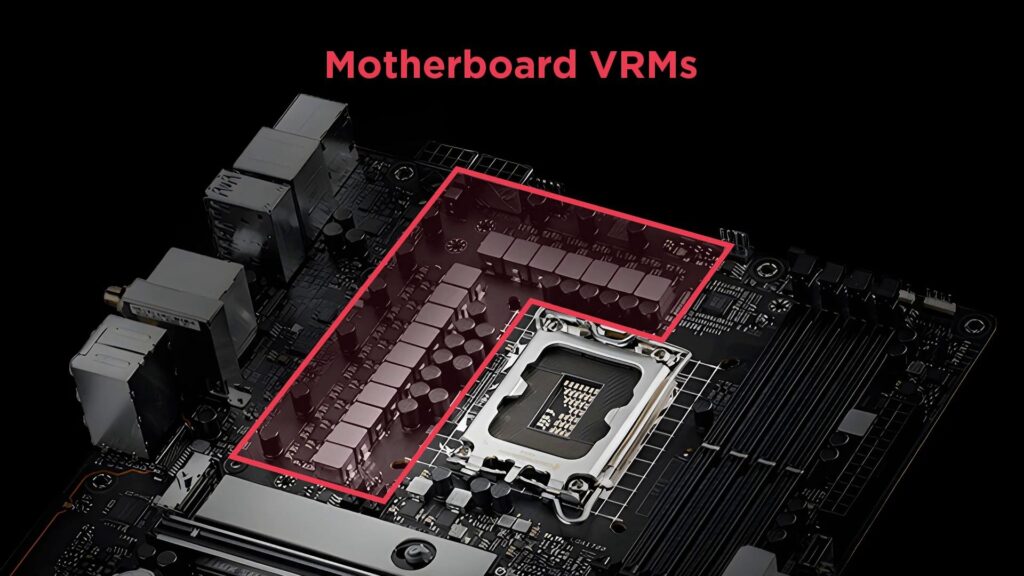
In this blog I’ll explain what VRM is, how it works, why VRM quality matters for gaming and overclocking, and what specs you should look at when choosing a motherboard.technoidinc+1
What does VRM stand for?
VRM stands for Voltage Regulator Module. It is an electronic circuit on the motherboard that converts the higher voltage from the power supply (PSU) into a lower, stable voltage that the CPU and other components can safely use.
Think of your main PSU as the “big power plant” that brings 12 V DC to the motherboard, and the VRM as the “local transformer station” that steps that 12 V down to around 1–1.4 V for the CPU. Without this step‑down, the CPU would burn out almost instantly.
Why is VRM important on a motherboard?
Modern CPUs need very low voltage but very high current, especially when gaming or overclocking. The VRM’s job is to:
- Convert voltage accurately (e.g., 12 V → ~1.2 V).
- Deliver that voltage smoothly, without sudden spikes or drops.
- React quickly when the CPU suddenly ramps up its power draw (like when launching a game or stressing the CPU).
If the VRM is weak or poorly designed, you can see:
- System crashes or random shutdowns.
- Inability to overclock, or unstable overclocks.
- Overheating VRM components (hot heatsinks near the CPU socket).
- In extreme cases, permanent damage to the motherboard or CPU.
For gamers and power users, a good VRM matters just as much as the CPU or GPU for overall stability and longevity.
How does a VRM work? (Simple explanation)
Most modern VRMs are buck converters, also known as switching regulators. Instead of wasting excess power as heat (like old linear regulators), they rapidly switch the current on and off to “chop” the high‑voltage input into a lower‑voltage output.
Here’s a simplified breakdown of the process:
- Input voltage from the PSU (typically +12 V DC) reaches the VRM circuit.
- A PWM controller (Pulse‑Width Modulation chip) decides how long the power switches should stay “on” versus “off” to get the target output voltage.
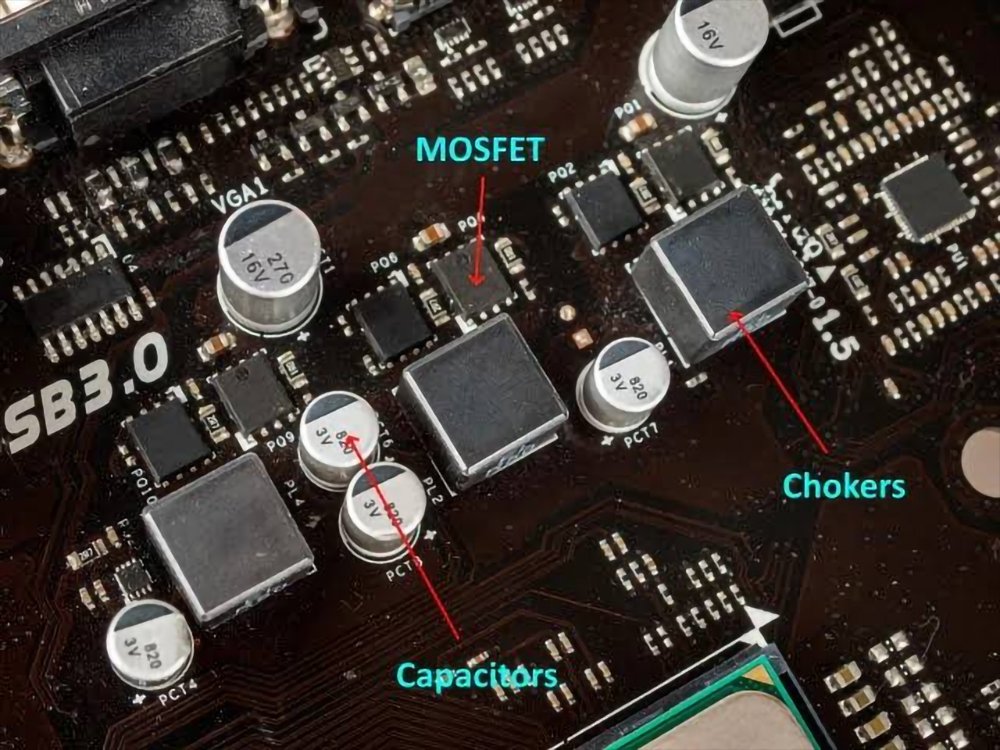
- MOSFETs act as high‑speed switches that pass current in controlled pulses.
- Inductors (chokes) smooth out the pulsed current into a steadier flow.
- Capacitors further filter and stabilize the voltage before it reaches the CPU.
You can imagine it like a faucet: opening and closing very quickly and precisely to deliver a perfectly steady stream of water (voltage) instead of flooding or cutting off the flow.
Key components of a motherboard VRM
A typical VRM setup near the CPU socket includes four main parts:
1. MOSFETs (Metal–Oxide–Semiconductor Field‑Effect Transistors)
MOSFETs are the switching transistors that turn the power on and off many thousands of times per second.
- They are usually arranged in pairs: high‑side MOSFET and low‑side MOSFET.
- Better‑quality MOSFETs run cooler and can handle more current, which improves efficiency and overclocking headroom.
2. Chokes (inductors)
Chokes are small coils that store energy and smooth the current.
- They prevent sharp current spikes from reaching the CPU.
- Higher‑quality chokes (often shielded or “high‑performance”) reduce electrical noise and heat.
3. Capacitors
Capacitors sit right before the CPU and help filter out ripples and stabilize the voltage.
- They are usually solid‑state or polymer‑type capacitors on modern boards.
- Poor capacitors can cause voltage drops, instability, or even bulging/leaking over time.
4. PWM controller
The PWM controller is a small chip that monitors the CPU’s voltage and current demand, then adjusts the MOSFETs’ switching pattern many times per second.
- It forms a feedback loop with the CPU, continuously checking if the supplied voltage matches what the CPU wants (often called V‑ref or reference voltage).
- If voltage is too high or low, it tweaks the switching pattern to correct it.
What are VRM phases?
You’ll often see phrases like “8+2 phase VRM” or “12+1 phase design” on motherboard marketing. These numbers refer to power phases in the VRM.blog.
A “phase” is one set of MOSFETs + inductor + capacitor + PWM control that works together. Multiple phases share the load so that:
- Power is delivered more evenly.
- Each phase runs cooler and less stressed.
- Voltage ripple is reduced, improving stability.
For example:
- A single phase VRM would have to handle all the CPU’s current on its own, which is inefficient and hot.
- A multi‑phase VRM (e.g., 8‑phase) splits that load into 8 smaller channels, so each phase carries roughly 1/8th of the total current.
Some boards also separate CPU core power from other components, which is why you see “8+2” or “10+1”:
- The first number (e.g., 8) is usually for the CPU core.
- The second number (e.g., 2) is for integrated graphics / memory controller / chipset.
Important note: More phases doesn’t automatically mean “better.” The quality of MOSFETs, chokes, capacitors, and cooling matters just as much—if not more—than the raw phase count.
Does VRM matter for gaming and overclocking?
Yes, especially if you:
- Use a high‑TDP CPU (e.g., Intel Core i7/i9 or AMD Ryzen 7/9).
- Plan to overclock the CPU or push it hard for gaming, streaming, or rendering.
- Want your system to stay cool and stable over long sessions.
A weak VRM on a budget board can:
- Throttle your CPU under heavy load to prevent overheating.
- Force the BIOS to reduce overclock settings automatically.
- Make the motherboard feel “noisy” under load (fans spin up because VRM heatsinks get hot).
A strong VRM with good heatsinks usually:
- Keeps voltage stable even when the CPU suddenly spikes from idle to full load.
- Allows safer and more aggressive overclocks.
- Reduces stress on the components, which can extend the motherboard’s lifespan.
For casual browsing or light office work, even a modest VRM is usually enough. But for gaming rigs, content‑creation builds, or overclocking setups, VRM quality becomes a real deciding factor in motherboard choice.
How to judge VRM quality when buying a motherboard
Here’s what to look for beyond just “X‑phase VRM” marketing:
1. Phase count (rough guideline)
- Entry‑level boards (for budget CPUs): 4–6 phases for the CPU may be acceptable if you’re not overclocking.
- Mainstream gaming boards: 8‑phase or 8+1‑phase VRM is a good sweet spot for mid‑range CPUs.
- High‑end enthusiast boards: 10+‑phase or 12+‑phase VRMs are common for top‑tier CPUs and heavy overclocks.
2. MOSFET type and VRM layout
- Look for mentions of DrMOS, high‑efficiency MOSFETs, or single‑die MOSFETs—these typically run cooler and more efficiently than older designs.
- A well‑spread layout with proper heatsinks on both MOSFETs and chokes indicates better thermal performance.
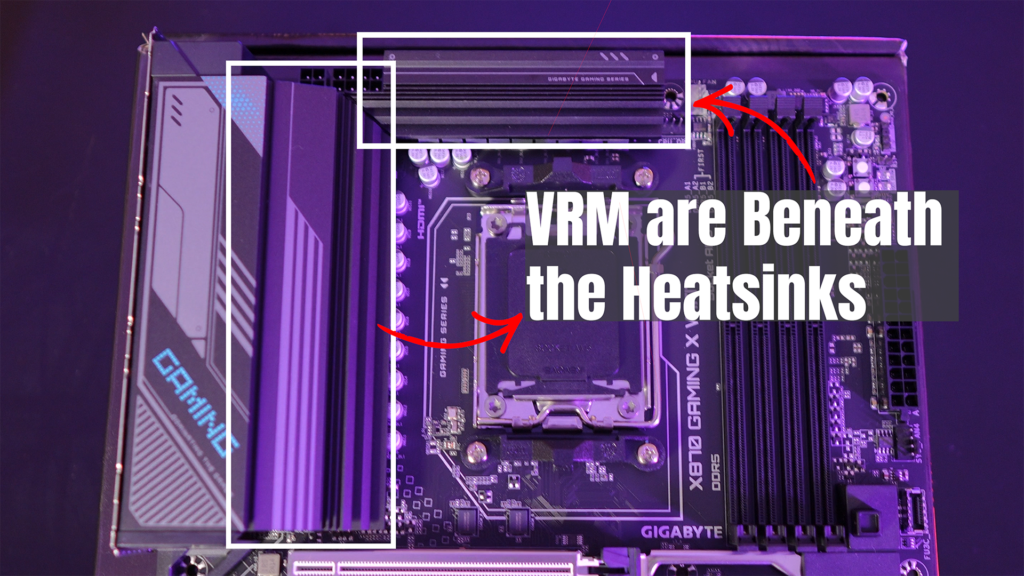
3. VRM heatsinks and cooling
- Thick metal heatsinks around the CPU socket are a visual clue of stronger VRM design.
- Boards aimed at overclocking often include direct heat pipes or extra fins on the VRM area.
4. TDP and CPU compatibility
Check the motherboard’s specs to see what CPU TDP it’s designed for.
- If a board is rated for 65–95 W CPUs, putting a 125–150 W CPU on it may overwhelm the VRM, especially if you overclock.
VRM beyond the CPU: RAM and chipset
Although we usually talk about VRM in the context of the CPU, the same concept applies elsewhere:
- RAM VRM / memory controller VRM: Supplies stable voltage to the RAM channels, which becomes important for high‑speed DDR4/DDR5 kits and XMP/DOCP profiles.
- Chipset VRM: Powers the motherboard’s chipset (like Intel Z790 or AMD B650E), which can get warm during heavy PCIe or storage workloads.technoidinc+1
A well‑designed board adjusts the VRM behavior for these parts too, helping with overall platform stability, not just CPU‑only performance.
VRM and overclocking: How they are linked
Overclocking increases both the voltage and current required by the CPU. As you push the clock speed higher, the VRM must:
- Deliver more stable power under fluctuating loads.
- Stay within safe temperatures despite higher power dissipation.
- Avoid voltage droop (sudden dips) when the CPU jumps from idle to full core usage.
A poor VRM will often:
- Introduce voltage droop, causing instability or crashes during benchmarks or games.
- Force the board to limit your overclock or even disable it automatically to prevent damage.
A good VRM typically:
- Lets you run higher voltages safely for longer periods.
- Keeps VRM temperatures under control, so the board doesn’t throttle or shut down.
- Gives you more room to experiment with multi‑core turbo, RAM speed, and cache tuning.
If you’re serious about overclocking, checking VRM reviews (especially thermal tests) on sites like Tom’s Hardware, PCMonks, or Guru3D is strongly recommended.
Modern VRM design trends and user impact
Today’s VRM designs are smarter and more adaptive:
- Digital PWM controllers allow finer control and easier tuning via BIOS/UEFI.
- High‑efficiency MOSFETs and chokes reduce power loss as heat, improving efficiency and cooling.
- Advanced power‑stage designs dynamically turn phases on or off based on load, saving power when idle.
For end users, this translates into:
- Lower power consumption at idle.
- Quieter fans because VRM components run cooler.
- Better stability for mixed workloads (gaming, streaming, multitasking).
Summary (in simple terms)
- VRM = Voltage Regulator Module: A circuit on the motherboard that converts PSU voltage (like 12 V) into the low, stable voltage the CPU needs (around 1–1.4 V).
- It’s made of MOSFETs, chokes, capacitors, and a PWM controller working together in phases.beeb
- VRM quality directly affects system stability, overclocking headroom, and how hot the motherboard runs under load.
- When buying a motherboard, look beyond “X‑phase” and check MOSFET type, heatsinks, and TDP ratings to match your CPU and usage (casual, gaming, or overclocking).
If you’re building a gaming PC or planning to overclock, taking a few minutes to understand the VRM will help you avoid a “bottlenecked” build and make your motherboard work better for years.
FAQ
Q1. What does VRM do in a motherboard?
A: VRM (Voltage Regulator Module) controls and stabilizes the power supplied to the CPU. It converts high voltage into a safe level so the processor can work properly without damage.
Q2. Is better VRM important for gaming?
A: Yes, a good VRM ensures stable power delivery, which helps maintain consistent performance during gaming, especially in high-end CPUs.
Q3. How to check VRM quality?
A: You can check VRM quality by looking at the number of phases, heatsink design, and motherboard reviews from trusted sources.
Q4. Can bad VRM damage CPU?
A: Yes, poor VRM can cause unstable voltage, overheating, and in extreme cases, it can reduce CPU lifespan or damage it.